Monday, January 2, 2012

MANY ipad apps

Hello!  Winter break has come and gone and here comes another semester... ready or not! ;)  Can't believe another year has begun as well!
Well, maybe your new years' resolution will be to learn more about using technology in your classroom!
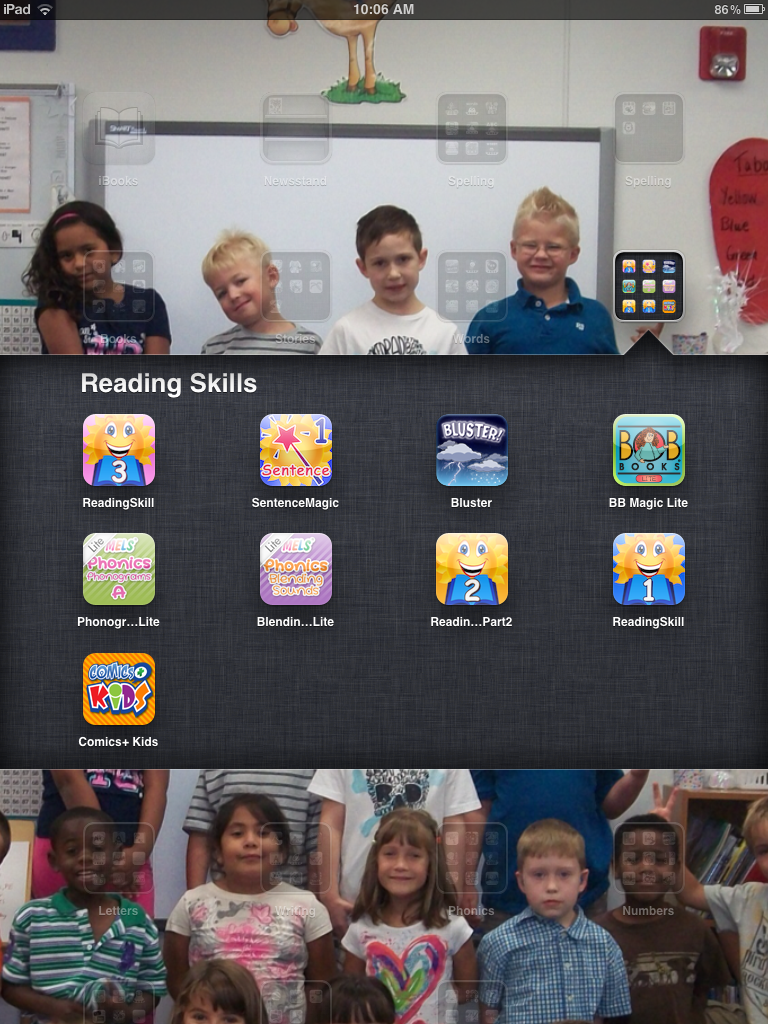
I have taken screenshots of the folders I created on my ipads, so you can see the apps I have downloaded for free for my students' usage.
Check them out!  They're mostly all ELAR skills for first graders, and especially for struggling first graders.  The name of the folder is listed.
(The background picture is of my class.)   :)


Friday, December 9, 2011

Daily 5

This book is an easy read, and cannot be more appropriate for a literacy workshop model. Daily 5 is my first graders' favorite time of the day! I've never been able to spend so much time working with my guided reading groups, and had such little maintenance for the workshop "station" or student choice activities. I cannot recommend this book enough!  Click here to go to "the sisters'" website to learn more about the Daily 5.

Wednesday, December 7, 2011

Friday, December 2, 2011

2 GREAT Websites 4 Learning!

I've been introduced to 2 FABULOUS websites that will be great for students to learn independently on.  Could be great for centers/stations/Daily 5/Tabor Math rotations, etc.  They can also access them at home.  

StudyLadder - You create a class, and then assign tasks.  Each student has their own account and login with an avatar they can edit to look like themselves.  They work to earn rewards and can able to spend them on things online.

DoveWhisper.com - The Dovewhisper Computer Centers were created as an effort to assist teachers in both incorporating technology and enriching their curricula. It is my hope that you and your students will find this site most beneficial and enriching.

Check them out!!! :)

Tuesday, November 8, 2011

Wikispaces Help


Wikispaces is a GREAT way to collaborate, and/or share information.  Wikispaces created this document to help people.  It is a "to the point" training for wikispaces.

 
Check out my class wiki for ideas about using Wikispaces with your class: http://colwell2011-12.wikispaces.com/ 

Great ipad app!

I found a GREAT app if you are using ipads in the classroom!

Check out PaperDesk.  Click here: for the link to the itunes page.  You can take a picture of a student's writing, or work sample, and insert it into a page where you can type and take notes about what that child did.  You can then email yourself, or the parents the page to see.  Great for monitoring progress!  The free version/Lite, works the same, but it has a limit to how many pages you can keep at the same time.

Tuesday, October 18, 2011

Graphic Organizers Galore!

Follow the link to a collection of websites with TONS of graphic organizers for all ages.  Some are interactive to use online, and some are printable.  Enjoy!

Delicious Paragraphs

Interactive Burger Paragraph Writer
Follow the link above, and you and your students can type their sentences on the burger.  You can use it for paragraphs, or beginning, middle, and end with events in the middle, or an essay like the example shows.  The way to a kid's heart is sometimes through their stomach!... or is that men?!  Anh, one in the same.  :)

Monday, October 17, 2011

Monster Mania!

In case your school is like mine, and many children don't celebrate, or cannot be a part of Halloween celebrations, why not have fun using monsters as a theme for a unit of literacy.  Our grade level is reading the book, I Need My Monster by Amanda Noll.
We are planning to have students create their own monsters on this website called Monster Maker.
Then, the students will use their monsters to write descriptive stories.

Here is another lesson plan idea from...
Or, check out these sites for more ways to use the book I Need My Monster...
(Thank you to my teammate Donna, for finding these resources!)

The Whiteboard Blog

Great website with ideas for using your SMARTboard/interactive whiteboard!
Click here to go to The Whiteboard Blog.

Sunday, October 9, 2011